
In this post we will share VB 6.0 about How to display data in database with combobox. Result of this tutorial when click data in combobox show or display data in database
Please following below :
1. Built database DB.accdb
We have DB.accdb with Table Customer :

2. Open your VB 6.0 application
Design form like below picture
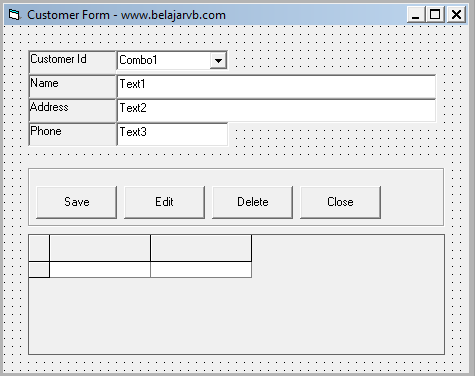 Copy DB.accdb include folder where you crated project VB 6.0
Place below code in form1 :
and the last, please run your projec
You can click here to download project / source code above
Please following below :
1. Built database DB.accdb
We have DB.accdb with Table Customer :
2. Open your VB 6.0 application
Design form like below picture
Place below code in form1 :
Dim Conn As New ADODB.Connection
Dim RSCustomer As ADODB.Recordset
Sub FormEmpty()
Text1 = ""
Text2 = ""
Text3 = ""
End Sub
Sub OpenDB()
Set Conn = New ADODB.Connection
Set RSCustomer = New ADODB.Recordset
Conn.Open "Provider=Microsoft.ACE.OLEDB.12.0;Data Source=" & App.Path & "\DB.accdb"
End Sub
Private Sub Form_Activate()
RSCustomer.Open "TBL_CUSTOMER", Conn
Combo1.Clear
Do Until RSCustomer.EOF
Combo1.AddItem RSCustomer!Customer_id
RSCustomer.MoveNext
Loop
End Sub
Private Sub Form_Load()
FormEmpty
Call OpenDB
Adodc1.ConnectionString = Conn
Adodc1.RecordSource = "TBL_CUSTOMER"
Adodc1.Refresh
Set DataGrid1.DataSource = Adodc1
End Sub
Private Sub Combo1_Click()
Call OpenDB
RSCustomer.Open ("Select * From TBL_Customer where Customer_id='" & Combo1 & "'"), Conn
If Not RSCustomer.EOF Then
Text1 = RSCustomer!Name
Text2 = RSCustomer!Address
Text3 = RSCustomer!Phone
End If
Conn.Close
End Sub
and the last, please run your projec
You can click here to download project / source code above


