Showing posts with label VB 2013 English Version. Show all posts

Visual Studio 2013 Tutorial

12:52:00 AM 0
Welcome to Belajar VB .com and thanks for visiting this Blog. in this blog you can Learn Visual Basic 6.0, VB 2005, VB 2008, VB 2010, VB 2012 and VB 2013.

in this page just focus to step by step learn Visual Basic 2013. Please follow below lesson

DATABASE CONNECTION VB .NET 2013

Number Description Click to View
1 VB 2013 - DB Access 2003 Connection View
2 VB 2013 - DB Access 2007 Connection View
3 VB 2013 - DB MySQL Connection View
4 VB 2013 - DB SQL Server Connection View

SIMPLE ADD, EDIT & DELETE VB.NET 2013

Number Description Click to View
1 VB 2013 - Simple Add, Edit & Delete DB Access 2003 View
2 VB 2013 - Simple Add, Edit & Delete DB Access 2007 View
3 VB 2013 - Simple Add, Edit & Delete DB MySQL View
4 VB 2013 - Simple Add, Edit & Delete DB SQL Server View

STEP BY STEP BUILD POS APPLICATION VB NET 2013

Step-1 : Create New Project POS Application Using VB Net 2013
Step-2 : Create Main Menu POS Application VB NET 2013 
Step-3 : Create Database and Table POS Application 
Step-4 : Create Database Connection Use Module VB NET 2013 
Step-5 : Create Login Form POS Application
Step-6 : Create User Form POS Application
Step-7 : Create Supplier Form POS Application
Step-8 : Create Customer Form POS Application
Step-9 : Create Product Form POS Application

TIPS & TRICK VISUAL BASIC .NET 2013

How to Display Data in ComboBox - VB Net 2013
How To Set Column Width DatagridView VB Net 2013
How to show Date and Time in Form VB NET 2013
How to show or Display data in Database to combobox VB Net 2013
How to create search data in form VB Net 2013

Simple Insert, Edit, Delete VB .Net 2013 DB MySQL

12:49:00 AM 0

In this tutorial we will share about Simple Add, Edit, Delete VB .Net 2013 DB MySQL.

#1
Create database name = mydb
Create table name = TBL_CUSTOMER
Fill sample data in TBL_CUSTOMER like below picture :
#2
Open your VB 2005 Application
Design Form1 like below picture :
Fill below code at Form1
Imports System.Data.Odbc
Public Class Form1
    Dim CONN As OdbcConnection
    Dim CMD As OdbcCommand
    Dim DS As New DataSet
    Dim DA As OdbcDataAdapter
    Dim RD As OdbcDataReader
    Dim DBLocation As String
    Sub DBConn()
        DBLocation = "Driver={MySQL ODBC 3.51 Driver};database=mydb;server=localhost;uid=root"
        CONN = New OdbcConnection(DBLocation)
        If CONN.State = ConnectionState.Closed Then
            CONN.Open()
        End If
    End Sub
    Sub EmptyForm()
        TextBox1.Clear()
        TextBox2.Clear()
        TextBox3.Clear()
        TextBox4.Clear()
        TextBox1.Focus()
    End Sub

    Sub ShowGrid()
        DA = New OdbcDataAdapter("select * from TBL_CUSTOMER", CONN)
        DS = New DataSet
        DA.Fill(DS, "TBL_CUSTOMER")
        DataGridView1.DataSource = DS.Tables("TBL_CUSTOMER")
        DataGridView1.ReadOnly = True
    End Sub

    Private Sub Button1_Click_1(ByVal sender As System.Object, ByVal e As System.EventArgs) Handles Button1.Click

        If TextBox1.Text.Length < 6 Or TextBox1.Text = "" Or TextBox2.Text = "" Or TextBox3.Text = "" Or TextBox4.Text = "" Then
            MsgBox("Data incompleted, Make sure all form is filled and customer id 6 digits")
            Exit Sub
        Else
            Call DBConn()
            CMD = New OdbcCommand("Select * from TBL_CUSTOMER where Customer_id='" & TextBox1.Text & "'", CONN)
            RD = CMD.ExecuteReader
            RD.Read()
            If Not RD.HasRows Then
                Dim simpan As String = "insert into TBL_CUSTOMER values ('" & TextBox1.Text & "','" & TextBox2.Text & "','" & TextBox3.Text & "','" & TextBox4.Text & "')"
                CMD = New OdbcCommand(simpan, CONN)
                CMD.ExecuteNonQuery()
                MsgBox("Add data successed", MsgBoxStyle.Information, "Information www.belajarvb.com")
            Else
                Dim edit As String = "update TBL_CUSTOMER set Name='" & TextBox2.Text & "',Address='" & TextBox3.Text & "',Phone='" & TextBox4.Text & "' where kodeAnggota='" & TextBox1.Text & "'"
                CMD = New OdbcCommand(edit, CONN)
                CMD.ExecuteNonQuery()
                MsgBox("Edit data successed", MsgBoxStyle.Information, "Information")
            End If
            Call ShowGrid()
            Call EmptyForm()
        End If
    End Sub

    Private Sub Button2_Click_1(ByVal sender As System.Object, ByVal e As System.EventArgs) Handles Button2.Click

        If TextBox1.Text = "" Then
            MsgBox("Customer id is empty, please filled it")
            TextBox1.Focus()
            Exit Sub
        Else
            If MessageBox.Show("Are you sure want to delete..?", "", MessageBoxButtons.YesNo) = Windows.Forms.DialogResult.Yes Then
                Dim hapus As String = "delete * from TBL_CUSTOMER where Customer_id='" & TextBox1.Text & "'"
                CMD = New OdbcCommand(hapus, CONN)
                CMD.ExecuteNonQuery()
                Call ShowGrid()
                Call EmptyForm()
                MsgBox("Deleted successed", MsgBoxStyle.Information, "Information")
            Else
                Call EmptyForm()
            End If
        End If
    End Sub

    Private Sub Button3_Click_1(ByVal sender As System.Object, ByVal e As System.EventArgs) Handles Button3.Click
        Call EmptyForm()
    End Sub

    Private Sub Button4_Click(ByVal sender As System.Object, ByVal e As System.EventArgs) Handles Button4.Click
        Me.Close()
    End Sub

    Private Sub Form1_Load(ByVal sender As System.Object, ByVal e As System.EventArgs) Handles MyBase.Load
        Call DBConn()
        Call ShowGrid()
        Call EmptyForm()
    End Sub

    Private Sub TextBox1_KeyPress1(ByVal sender As Object, ByVal e As System.Windows.Forms.KeyPressEventArgs) Handles TextBox1.KeyPress
        TextBox1.MaxLength = 6
        If e.KeyChar = Chr(13) Then
            Call DBConn()
            CMD = New OdbcCommand("Select * from TBL_CUSTOMER where Customer_id='" & TextBox1.Text & "'", CONN)
            RD = CMD.ExecuteReader
            RD.Read()
            If Not RD.HasRows Then
                TextBox2.Text = ""
                TextBox3.Text = ""
                TextBox4.Text = ""
                TextBox2.Focus()
            Else
                TextBox2.Text = RD.Item("Name")
                TextBox3.Text = RD.Item("Address")
                TextBox4.Text = RD.Item("Phone")
                TextBox2.Focus()
            End If
        End If
    End Sub

    Private Sub TextBox2_KeyPress1(ByVal sender As Object, ByVal e As System.Windows.Forms.KeyPressEventArgs) Handles TextBox2.KeyPress
        TextBox2.MaxLength = 50
        If e.KeyChar = Chr(13) Then TextBox3.Focus()
    End Sub

    Private Sub TextBox3_KeyPress(ByVal sender As Object, ByVal e As System.Windows.Forms.KeyPressEventArgs) Handles TextBox3.KeyPress
        TextBox3.MaxLength = 50
        If e.KeyChar = Chr(13) Then TextBox4.Focus()
    End Sub
    Private Sub TextBox4_KeyPress1(ByVal sender As Object, ByVal e As System.Windows.Forms.KeyPressEventArgs) Handles TextBox4.KeyPress
        TextBox4.MaxLength = 15
        If e.KeyChar = Chr(13) Then Button1.Focus()
    End Sub
End Class
Run your project and You can click here to download Project above / source code

Simple Insert, Edit, Delete VB .Net 2013 DB Access 2007 (accdb)

12:46:00 AM 0
in this tutorial Visual Studio 2005, we will share about How to make form Add, Edit, Delete VB 2013 with database Access 2007 (accdb). You can also use MS Office 2010 or 2013, because they have same extension (accdb)

We have Database with name : DB.accdb
and we create also Table with name : TBL_CUSTOMER
Open your VB 2013
Cretae design form like below picture :

Place source code at Form1 :
Imports System.Data.OleDb
Public Class Form1
    Dim CONN As OleDbConnection
    Dim CMD As OleDbCommand
    Dim DS As New DataSet
    Dim DA As OleDbDataAdapter
    Dim RD As OleDbDataReader
    Dim DBLocation As String
    Sub DBConn()
        DBLocation = "Provider=Microsoft.ACE.OLEDB.12.0;Data Source=DB.accdb"
        CONN = New OleDbConnection(DBLocation)
        If CONN.State = ConnectionState.Closed Then
            CONN.Open()
        End If
    End Sub
    Sub EmptyForm()
        TextBox1.Clear()
        TextBox2.Clear()
        TextBox3.Clear()
        TextBox4.Clear()
        TextBox1.Focus()
    End Sub

    Sub TampilGrid()
        DA = New OleDbDataAdapter("select * from TBL_CUSTOMER", CONN)
        DS = New DataSet
        DA.Fill(DS, "TBL_CUSTOMER")
        DataGridView1.DataSource = DS.Tables("TBL_CUSTOMER")
        DataGridView1.ReadOnly = True
    End Sub

    Private Sub Button1_Click_1(ByVal sender As System.Object, ByVal e As System.EventArgs) Handles Button1.Click

        If TextBox1.Text.Length < 6 Or TextBox1.Text = "" Or TextBox2.Text = "" Or TextBox3.Text = "" Or TextBox4.Text = "" Then
            MsgBox("Data incompleted, Make sure all form is filled and customer id 6 digits")
            Exit Sub
        Else
            Call DBConn()
            CMD = New OleDbCommand("Select * from TBL_CUSTOMER where Customer_id='" & TextBox1.Text & "'", CONN)
            RD = CMD.ExecuteReader
            RD.Read()
            If Not RD.HasRows Then
                Dim simpan As String = "insert into TBL_CUSTOMER values ('" & TextBox1.Text & "','" & TextBox2.Text & "','" & TextBox3.Text & "','" & TextBox4.Text & "')"
                CMD = New OleDbCommand(simpan, CONN)
                CMD.ExecuteNonQuery()
                MsgBox("Add data successed", MsgBoxStyle.Information, "Information")
            Else
                Dim edit As String = "update TBL_CUSTOMER set Name='" & TextBox2.Text & "',Address='" & TextBox3.Text & "',Phone='" & TextBox4.Text & "' where kodeAnggota='" & TextBox1.Text & "'"
                CMD = New OleDbCommand(edit, CONN)
                CMD.ExecuteNonQuery()
                MsgBox("Edit data successed", MsgBoxStyle.Information, "Information")
            End If
            Call TampilGrid()
            Call EmptyForm()
        End If
    End Sub

    Private Sub Button2_Click_1(ByVal sender As System.Object, ByVal e As System.EventArgs) Handles Button2.Click

        If TextBox1.Text = "" Then
            MsgBox("Customer id is empty, please filled it")
            TextBox1.Focus()
            Exit Sub
        Else
            If MessageBox.Show("Are you sure want to delete..?", "", MessageBoxButtons.YesNo) = Windows.Forms.DialogResult.Yes Then
                Dim hapus As String = "delete * from TBL_CUSTOMER where Customer_id='" & TextBox1.Text & "'"
                CMD = New OleDbCommand(hapus, CONN)
                CMD.ExecuteNonQuery()
                Call TampilGrid()
                Call EmptyForm()
                MsgBox("Deleted successed", MsgBoxStyle.Information, "Information")
            Else
                Call EmptyForm()
            End If
        End If
    End Sub

    Private Sub Button3_Click_1(ByVal sender As System.Object, ByVal e As System.EventArgs) Handles Button3.Click
        Call EmptyForm()
    End Sub

    Private Sub Button4_Click(ByVal sender As System.Object, ByVal e As System.EventArgs) Handles Button4.Click
        Me.Close()
    End Sub

    Private Sub Form1_Load(ByVal sender As System.Object, ByVal e As System.EventArgs) Handles MyBase.Load
        Call DBConn()
        Call TampilGrid()
        Call EmptyForm()
    End Sub

    Private Sub TextBox1_KeyPress1(ByVal sender As Object, ByVal e As System.Windows.Forms.KeyPressEventArgs) Handles TextBox1.KeyPress
        TextBox1.MaxLength = 6
        If e.KeyChar = Chr(13) Then
            Call DBConn()
            CMD = New OleDbCommand("Select * from TBL_CUSTOMER where Customer_id='" & TextBox1.Text & "'", CONN)
            RD = CMD.ExecuteReader
            RD.Read()
            If Not RD.HasRows Then
                TextBox2.Text = ""
                TextBox3.Text = ""
                TextBox4.Text = ""
                TextBox2.Focus()
            Else
                TextBox2.Text = RD.Item("Name")
                TextBox3.Text = RD.Item("Address")
                TextBox4.Text = RD.Item("Phone")
                TextBox2.Focus()
            End If
        End If
    End Sub

    Private Sub TextBox2_KeyPress1(ByVal sender As Object, ByVal e As System.Windows.Forms.KeyPressEventArgs) Handles TextBox2.KeyPress
        TextBox2.MaxLength = 50
        If e.KeyChar = Chr(13) Then TextBox3.Focus()
    End Sub

    Private Sub TextBox3_KeyPress(ByVal sender As Object, ByVal e As System.Windows.Forms.KeyPressEventArgs) Handles TextBox3.KeyPress
        TextBox3.MaxLength = 50
        If e.KeyChar = Chr(13) Then TextBox4.Focus()
    End Sub
    Private Sub TextBox4_KeyPress1(ByVal sender As Object, ByVal e As System.Windows.Forms.KeyPressEventArgs) Handles TextBox4.KeyPress
        TextBox4.MaxLength = 15
        If e.KeyChar = Chr(13) Then Button1.Focus()
    End Sub
and the Last you can Run your Project
Below the result :

You can click here to download Project above / source code

Simple Insert, Edit, Delete VB .Net 2013 Access 2003 (mdb)

12:41:00 AM 0
in this tutorial Visual Studio 2005, we will share about How to make form Add, Edit, Delete VB 2013 with database Access 2003 (mdb).

We have Database with name : DB.mdb
and we create also Table with name : TBL_CUSTOMER
Open your VB 2013

See also : How to connect DB MySQL in VB NET 2013

Cretae design form like below picture :
Place source code at Form1 :
Imports System.Data.OleDb
Public Class Form1
    Dim CONN As OleDbConnection
    Dim CMD As OleDbCommand
    Dim DS As New DataSet
    Dim DA As OleDbDataAdapter
    Dim RD As OleDbDataReader
    Dim DBLocation As String
    Sub DBConn()
        DBLocation = "provider=microsoft.jet.oledb.4.0;data source=DB.mdb;"
        CONN = New OleDbConnection(DBLocation)
        If CONN.State = ConnectionState.Closed Then
            CONN.Open()
        End If
    End Sub
    Sub EmptyForm()
        TextBox1.Clear()
        TextBox2.Clear()
        TextBox3.Clear()
        TextBox4.Clear()
        TextBox1.Focus()
    End Sub

    Sub TampilGrid()
        DA = New OleDbDataAdapter("select * from TBL_CUSTOMER", CONN)
        DS = New DataSet
        DA.Fill(DS, "TBL_CUSTOMER")
        DataGridView1.DataSource = DS.Tables("TBL_CUSTOMER")
        DataGridView1.ReadOnly = True
    End Sub

    Private Sub Button1_Click_1(ByVal sender As System.Object, ByVal e As System.EventArgs) Handles Button1.Click

        If TextBox1.Text.Length < 6 Or TextBox1.Text = "" Or TextBox2.Text = "" Or TextBox3.Text = "" Or TextBox4.Text = "" Then
            MsgBox("Data incompleted, Make sure all form is filled and customer id 6 digits")
            Exit Sub
        Else
            Call DBConn()
            CMD = New OleDbCommand("Select * from TBL_CUSTOMER where Customer_id='" & TextBox1.Text & "'", CONN)
            RD = CMD.ExecuteReader
            RD.Read()
            If Not RD.HasRows Then
                Dim simpan As String = "insert into TBL_CUSTOMER values ('" & TextBox1.Text & "','" & TextBox2.Text & "','" & TextBox3.Text & "','" & TextBox4.Text & "')"
                CMD = New OleDbCommand(simpan, CONN)
                CMD.ExecuteNonQuery()
                MsgBox("Add data successed", MsgBoxStyle.Information, "Information")
            Else
                Dim edit As String = "update TBL_CUSTOMER set Name='" & TextBox2.Text & "',Address='" & TextBox3.Text & "',Phone='" & TextBox4.Text & "' where kodeAnggota='" & TextBox1.Text & "'"
                CMD = New OleDbCommand(edit, CONN)
                CMD.ExecuteNonQuery()
                MsgBox("Edit data successed", MsgBoxStyle.Information, "Information")
            End If
            Call TampilGrid()
            Call EmptyForm()
        End If
    End Sub

    Private Sub Button2_Click_1(ByVal sender As System.Object, ByVal e As System.EventArgs) Handles Button2.Click

        If TextBox1.Text = "" Then
            MsgBox("Customer id is empty, please filled it")
            TextBox1.Focus()
            Exit Sub
        Else
            If MessageBox.Show("Are you sure want to delete..?", "", MessageBoxButtons.YesNo) = Windows.Forms.DialogResult.Yes Then
                Dim hapus As String = "delete * from TBL_CUSTOMER where Customer_id='" & TextBox1.Text & "'"
                CMD = New OleDbCommand(hapus, CONN)
                CMD.ExecuteNonQuery()
                Call TampilGrid()
                Call EmptyForm()
                MsgBox("Deleted successed", MsgBoxStyle.Information, "Information")
            Else
                Call EmptyForm()
            End If
        End If
    End Sub

    Private Sub Button3_Click_1(ByVal sender As System.Object, ByVal e As System.EventArgs) Handles Button3.Click
        Call EmptyForm()
    End Sub

    Private Sub Button4_Click(ByVal sender As System.Object, ByVal e As System.EventArgs) Handles Button4.Click
        Me.Close()
    End Sub

    Private Sub Form1_Load(ByVal sender As System.Object, ByVal e As System.EventArgs) Handles MyBase.Load
        Call DBConn()
        Call TampilGrid()
        Call EmptyForm()
    End Sub

    Private Sub TextBox1_KeyPress1(ByVal sender As Object, ByVal e As System.Windows.Forms.KeyPressEventArgs) Handles TextBox1.KeyPress
        TextBox1.MaxLength = 6
        If e.KeyChar = Chr(13) Then
            Call DBConn()
            CMD = New OleDbCommand("Select * from TBL_CUSTOMER where Customer_id='" & TextBox1.Text & "'", CONN)
            RD = CMD.ExecuteReader
            RD.Read()
            If Not RD.HasRows Then
                TextBox2.Text = ""
                TextBox3.Text = ""
                TextBox4.Text = ""
                TextBox2.Focus()
            Else
                TextBox2.Text = RD.Item("Name")
                TextBox3.Text = RD.Item("Address")
                TextBox4.Text = RD.Item("Phone")
                TextBox2.Focus()
            End If
        End If
    End Sub

    Private Sub TextBox2_KeyPress1(ByVal sender As Object, ByVal e As System.Windows.Forms.KeyPressEventArgs) Handles TextBox2.KeyPress
        TextBox2.MaxLength = 50
        If e.KeyChar = Chr(13) Then TextBox3.Focus()
    End Sub

    Private Sub TextBox3_KeyPress(ByVal sender As Object, ByVal e As System.Windows.Forms.KeyPressEventArgs) Handles TextBox3.KeyPress
        TextBox3.MaxLength = 50
        If e.KeyChar = Chr(13) Then TextBox4.Focus()
    End Sub
    Private Sub TextBox4_KeyPress1(ByVal sender As Object, ByVal e As System.Windows.Forms.KeyPressEventArgs) Handles TextBox4.KeyPress
        TextBox4.MaxLength = 15
        If e.KeyChar = Chr(13) Then Button1.Focus()
    End Sub
End Class

and the Last you can Run your Project
Below the result :

You can click here to download Project above / source code and Stay tuned for our next lesson :)

VB .Net 2013 - DB MySQL Connection

12:31:00 AM 0
VB .Net 2013 - DB Access 2003 (accdb) Connection
This is Tutorial Visual Basic .Net 2013 : How to connect to database MySQL.
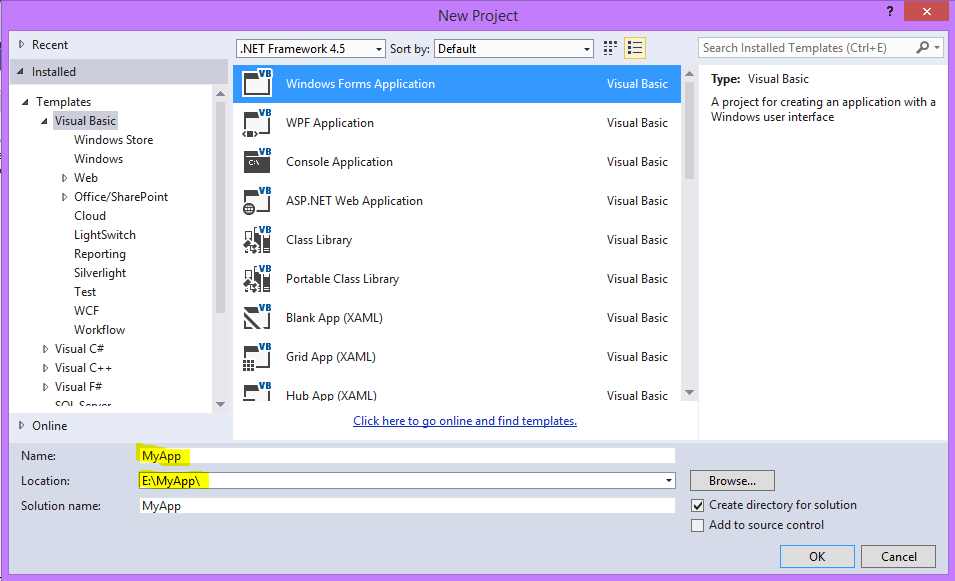
  • Step 1: Create New Project use VB 2013
  • Step 2 :Create database and table in MySQL
  • Step 3 : Design form in VB .Net 2013
#Step 1 :
Make sure you already install VB 2013 in your computer

See also : How to connect DB Access in VB NET 2013

Open Visual Studio 2013
Click Visual Studio 2013

Click File - New - Project
after that like below picture :
Click OK
After that, please follow STEP 2
#Step 2 :
Create Database in MySQL (Xampp) with name of database = mydb
Create table = TBL_PRODUCT
Fill sample data in TBL_PRODUCT

#Step 3
Open your VB 2005 Application
Design form1 like below picture :
Just add "Datagridview1" in Form1
Place below code at Form1


Imports System.Data.Odbc
Public Class Form1
    Dim Conn As OdbcConnection
    Dim da As OdbcDataAdapter
    Dim ds As DataSet
    Dim str As String
    Private Sub Form1_Load(ByVal sender As Object, ByVal e As EventArgs) _
       Handles MyBase.Load
        Me.Text = "
www.belajarvb.com"
        Koneksi()
        da = New OdbcDataAdapter("Select * from TBL_PRODUCT", Conn)
        ds = New DataSet
        ds.Clear()
        da.Fill(ds, "TBL_PRODUCT")
        DataGridView1.DataSource = (ds.Tables("TBL_PRODUCT"))
    End Sub
    Sub Koneksi()
        str = "Driver={MySQL ODBC 3.51 Driver};database=mydb;server=localhost;uid=root"
        Conn = New OdbcConnection(Str)
        If Conn.State = ConnectionState.Closed Then
            Conn.Open()
        End If
    End Sub
End Class

Please click here to download project / source code above and Stay tuned for our next lesson :)

VB 2013 - DB Access 2007 (accdb) Connection

12:24:00 AM 0
VB .Net 2013 - DB Access 2003 (accdb) Connection
This is Tutorial Visual Basic .Net 2013 : How to connect Database MS Access 2007 (.accdb). You can also using Microsoft Office Access 2010 or 2013.
  • Step 1: Create New Project use VB 2013
  • Step 2 :Create database and table in MS Access 2007
  • Step 3 : Design form in VB .Net 2013
#Step 1 :
Make sure you already install VB 2013 in your computer

See also : How to Connect DB SQL Server to VB NET 2013

Open Visual Studio 2013
Click Visual Studio 2013

Click File - New - Project
after that like below picture :
Click OK
After that, please follow STEP 2
#Step 2 :
Create Database use MS Access 2007
Database name : db.mdb
Table name : TBL_PRODUCT
design table like below picture :


fill sample product


 Save db.mdb at : D:\MyApp\MyApp\MyApp\bin\Debug

 #Step 3 :
Design form1 like below picture
Just add "Datagridview1" in Form1

Place below code in Form1.vb
Imports System.Data.OleDb
Public Class Form1
    Dim Conn As OleDbConnection
    Dim da As OleDbDataAdapter
    Dim ds As DataSet
    Dim DBLocation As String
    Sub DBConn()
        DBLocation = "Provider=Microsoft.ACE.OLEDB.12.0;Data Source=DB.accdb"
        Conn = New OleDbConnection(DBLocation)
        If Conn.State = ConnectionState.Closed Then Conn.Open()
    End Sub
    Private Sub Form1_Load(ByVal sender As System.Object, ByVal e As System.EventArgs) Handles MyBase.Load
        DBConn()
        da = New OleDbDataAdapter("Select * from TBL_Product", Conn)
        ds = New DataSet
        ds.Clear()
        da.Fill(ds, "TBL_Product")
        DataGridView1.DataSource = (ds.Tables("TBL_Product"))
    End Sub
End Class

Here the result :
Please click here to download project / source code above and Stay tuned for our next lesson :)